
Ready to get started?
Easily integrate next-generation payments and financial data into any app. Build powerful products your customers love.
SHARE ARTICLE


 Share link copied!
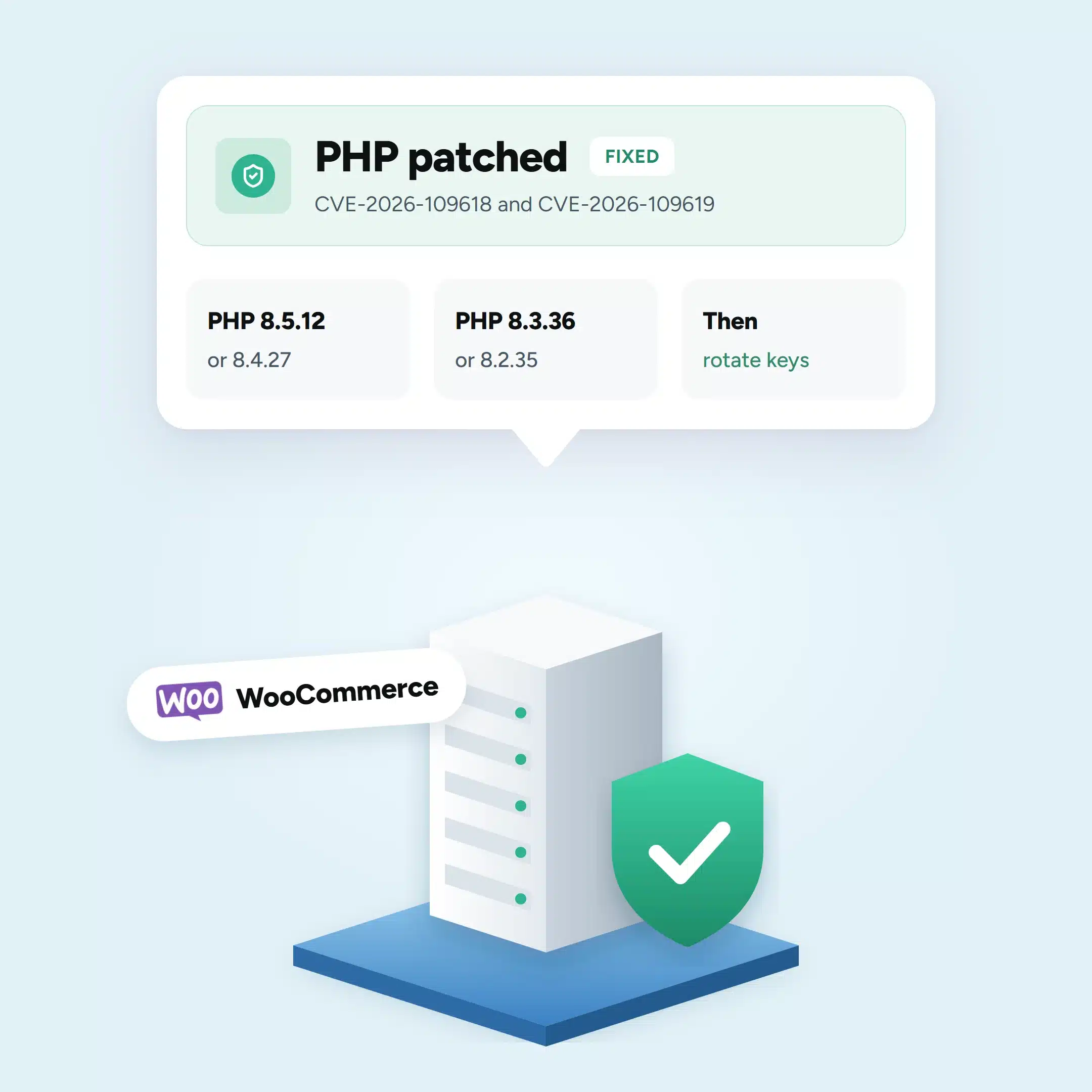
On 21 October 2026, PHP released fixes for two vulnerabilities known together as PHP2Shell. The flaws could allow hackers to access sensitive information or run harmful code on affected website servers.
For online stores, the concern goes beyond keeping the website running. WooCommerce handles customer accounts, orders and connections to payment providers, all of which depend on the server operating securely.
The good news is that security fixes are available. The first thing to establish is whether your hosting provider has installed them.
What Is PHP2Shell, and How Does It Affect WooCommerce?
PHP is the software that helps WordPress and WooCommerce work behind the scenes. It processes information when customers browse products, update their baskets or place orders.
PHP2Shell is the name given to two security flaws in that software:
- CVE-2026-109618: A flaw involving how PHP handles memory errors.
- CVE-2026-109619: A flaw that can leave information in PHP’s memory accessible when it should no longer be used.
Both flaws can potentially allow someone to access information or run commands on an affected server without logging in.
For a WooCommerce business, an attacker who successfully exploits these flaws might be able to access stored information, change website files or steal private connection keys used by plugins.
The vulnerabilities received a critical security rating of 9.2 out of 10. However, a critical rating doesn’t mean every vulnerable website has been compromised.
Sansec’s updated investigation on 22 October found that known attacks require particular server conditions, making widespread exploitation less straightforward than initially feared.
That reduces some of the immediate uncertainty, but it doesn’t remove the need to update PHP.
Which PHP Versions Fix PHP2Shell?
PHP released the following security fixes on 21 October 2026.
| PHP Version | First Fixed Release |
|---|---|
| PHP 8.5 | 8.5.12 |
| PHP 8.4 | 8.4.27 |
| PHP 8.3 | 8.3.36 |
| PHP 8.2 | 8.2.35 |
| PHP 8.1 or older | No new official PHP release |
If your website runs PHP 8.3.35, for example, it needs version 8.3.36 or a later update in that series.
For stores using PHP 8.1 or older, the situation is different. Those versions no longer receive official releases from PHP, although some hosting providers supply their own security patches.
An older version number may therefore appear in WordPress even after a hosting provider has installed a fix. Ask your provider to confirm that both PHP2Shell vulnerabilities have been addressed rather than relying on the number alone.
WooCommerce recommends PHP 8.3 or newer, although compatibility with the other plugins and themes on your website should be checked before upgrading.
PHP 8.2 also reaches the end of its security support on 31 December 2026. Businesses using it should plan their next upgrade.
The release details are available in the official PHP security advisory.
How to Check Your PHP Version in WooCommerce
You can find your website’s PHP version without installing another plugin.
- Sign in to your WordPress dashboard.
- Open Tools → Site Health.
- Click the Info tab.
- Expand the Server section.
- Find the number next to PHP version.
Compare it with the fixed versions in the table above.
If your website uses a supported version but hasn’t received the necessary security update, contact your hosting provider.
What should you ask your hosting provider?
A short message is enough:
Could you confirm whether the PHP running my WooCommerce website has been patched for CVE-2026-109618 and CVE-2026-109619? Please also confirm that the updated PHP service is running.
The second question matters because installing an update doesn’t always mean the website has started using the updated software.
What if your store uses managed WordPress hosting?
If your WooCommerce store is hosted on WordPress.com, WordPress VIP, Pressable or WP Cloud, WooCommerce confirmed on 21 October that these services were already protected.
For other managed hosting services, check your provider’s security announcements or contact support.
If you run your own server, your developer or server administrator will need to install the appropriate PHP update.
How to Fix PHP2Shell on a WooCommerce Store
The PHP2Shell fix must be installed on the server that runs your website.
Updating WordPress, WooCommerce or a security plugin will not fix these vulnerabilities on its own.
WordPress and WooCommerce both confirmed this in their security announcements on 21 October.
Your hosting provider or developer should apply the correct PHP security update, restart the affected services and confirm the fix is active.
Before switching to a newer PHP version, they should also check that your theme, plugins and payment integrations support it. Testing the change on a separate copy of the website can help identify compatibility problems before they affect customers.
What if your hosting provider hasn’t installed the update?
Ask when the patch will be available and whether temporary protection has been enabled.
Some hosting providers use a web application firewall (WAF), which helps identify and block suspicious requests before they reach the website.
Cloudflare introduced PHP2Shell protections on 21 October, including protection for customers using its free WAF service.
These measures can reduce exposure while the update is being applied, but they don’t replace the security fix.
Temporary restrictions can also affect some checkout forms. Ask your hosting provider whether any new security rules could interfere with WooCommerce orders or payments.
The UK’s National Cyber Security Centre advises organisations to consider taking affected systems offline when they cannot apply adequate protection. Whether that’s necessary for your store depends on its hosting setup and the advice of your security provider.
Can PHP2Shell Affect WooCommerce Payments and Customer Data?
Potentially, although the risk depends on how your website and payment methods are set up.
WooCommerce stores commonly use payment plugins to connect their checkout to a payment provider. These connections often rely on private API keys, which act like passwords between the website and the payment service.
If an attacker gains access to the server, those keys could be exposed. An attacker might also alter checkout pages or interfere with how payment information is handled.
This doesn’t mean customers’ card details have necessarily been stolen. Some payment methods collect sensitive payment information directly through the payment provider rather than storing it on the merchant’s website.
However, a compromised website can still create risks, regardless of the payment method.
There have also been reports of attempts to exploit PHP2Shell before the fix became available. Amazon Threat Intelligence identified an attempt on 17 October 2026.
For that reason, businesses should ask their hosting provider to review any suspicious website activity from at least that date.
If anything unusual is found, the investigation should cover website files, administrator accounts and the private keys used by payment plugins.
WooCommerce Checkout Checks After Updating PHP
Installing the PHP security fix is the first priority. After that, check that customers can still place orders and that payments reach your business correctly.
Check the Shopping Basket and Checkout
Add a product to your basket and go through the checkout process.
Check that customers can enter their details, choose delivery options and reach the payment page without errors.
If your host temporarily restricted certain website requests during the security update, these checks are especially important.
Test Each Payment Method
Use the test mode offered by your payment provider, where available, to place an order.
Check that the payment goes through and the order appears in WooCommerce with the correct status.
A payment can succeed with the provider but fail to update the WooCommerce order if the connection between the two systems isn’t working properly.
Review Payment Settings and Recent Transactions
Open WooCommerce → Settings → Payments and review your enabled payment methods.
Check the corresponding payment provider dashboards for unfamiliar transactions, refunds or changes to payment settings.
If your provider uses API keys or webhook signing secrets, ask your developer whether they need replacing. A webhook is simply a way for the payment provider to tell WooCommerce when a transaction has succeeded, failed or been refunded.
Look for Unusual Website Changes
Ask your developer or hosting provider to check for unfamiliar administrator accounts, unexpected changes to website files or unusual activity in server records.
A PHP update prevents the known vulnerabilities from being exploited again through an updated installation. It does not automatically remove changes made during an earlier compromise.
If your investigation suggests customer information may have been exposed, seek appropriate incident-response help and assess whether a report is required under the UK’s data protection rules.
What Atoa Pay for WooCommerce Users Should Check
For stores using Atoa Pay for WooCommerce, there is also a plugin update to review. Version 1.5.3, released on 22 October 2026, raises the plugin’s minimum PHP requirement to 8.2.35, the first PHP 8.2 version containing the security fixes.
This doesn’t replace the PHP update itself. Stores running PHP 8.3, 8.4 or 8.5 still need the relevant patched release for their version.
Once your hosting provider confirms that PHP is secure:
- Update the Atoa plugin. In WordPress, open Plugins and check that Atoa Pay for WooCommerce is running version 1.5.3 or later.
- Review your API key. In the Atoa dashboard, go to Settings → API Access. If the key needs replacing, generate a new Production API key.
- Update your WooCommerce settings. Open WooCommerce → Settings → Payments, select Manage next to Atoa – Pay by Bank App, enter the new key in the Access Secret field, confirm the Store Location and save.
- Arrange replacement of old credentials. Contact [email protected] to confirm the previous key has been revoked and to review your Webhook Signing Secret.
- Test your payment methods. Check Pay by Bank and Pay by Card, if enabled, and confirm that the payment statuses match the orders in WooCommerce.
Atoa’s Sandbox Mode can be used to test payment flows without processing real transactions.
Once these checks are complete, your store should have the PHP2Shell fix in place and its payment connections verified. Continue monitoring your website and follow up promptly on anything unusual found during the security review.
Frequently asked questions
What is PHP2Shell?
PHP2Shell is the nickname for two serious security holes in PHP, the software that every WordPress, WooCommerce and Magento website runs on. Fixed on 21 October 2026, they could let a stranger take control of a website’s server without a password. Because the problem is in PHP rather than in any plugin, the fix is a PHP update made by your host or developer.
Which PHP versions fix PHP2Shell?
PHP 8.5.12, 8.4.27, 8.3.36 and 8.2.35 contain the fix. PHP 8.1 and older get no new release from the PHP project, although its security team published fixes that some hosts have added, sometimes without changing the version number. The safest way to know you’re covered is to ask your host to confirm in writing that the PHP running your website has been fixed.
Will updating WordPress or WooCommerce fix PHP2Shell?
No. WordPress.org says the problem is not specific to WordPress and that “No WordPress update is required or planned for these issues.” The fix is an update to PHP on your server, made by your host or developer. Security plugins and maintenance mode won’t stop the attack either, because it happens before WordPress has started.
Is my customers’ card data at risk?
It depends on how your checkout works and whether anyone got into your server before it was fixed. Someone in control of a server can change checkout pages to copy what customers type, which is why you should check for code you didn’t add and change your payment keys. With Pay by Bank, customers approve payments in their own Bank app, so no card numbers are typed into your site.
How long will PHP 8.2 be supported?
PHP 8.2 gets security fixes until 31 December 2026, according to php.net, and none after that. It received the PHP2Shell fix in version 8.2.35, but if your shop runs on 8.2 it’s worth planning the move to 8.3 or 8.4 now. Ask your developer to test your theme, plugins and payment options on a test copy of your website first.
Is PHP 7.4 still safe?
Not without extra help from your host. The PHP project no longer supports 7.4 and won’t release a PHP2Shell update for it, although its security team published a basic fix that some hosts have added. Even then, 7.4 misses years of other security fixes, so ask your host or developer to move your website to a supported version of PHP.
Sources
- php.net, Security advisory: Critical remote code execution vulnerabilities, update now (21 October 2026) and Supported versions, checked 22 October 2026
- PHP security advisories GHSA-w8hw-w9fx-j79w and GHSA-6wmf-4rv5-p3rp, checked 22 October 2026
- NCSC, Critical security issue affecting PHP (21 October 2026), checked 22 October 2026
- WordPress.org, Critical PHP Security Release (John Blackbourn, 21 October 2026) and FAQ My site was hacked, checked 22 October 2026
- AWS Security Blog, Amazon Threat Intelligence identifies PHP2Shell exploitation prior to public disclosure in MadPot (CJ Moses, 21 October 2026), checked 22 October 2026
- Sansec, PHP2Shell: Critical PHP RCE (21 October 2026), checked 22 October 2026
- Cloudflare, Cloudflare deploys protections against php2shell vulnerability (21 October 2026), checked 22 October 2026
- ICO, UK GDPR data breach reporting, checked 22 October 2026
- Atoa, Atoa Pay for WooCommerce plugin listing (version 1.5.3) and Pay by Bank, checked 22 October 2026
SHARE ARTICLE
Share link copied!